
The plain-English answer
Use AI without memory when truth matters more than personalization.
Memory is useful when you want continuity. It is risky when you want a neutral answer. If an AI knows your preferences, fears, projects, beliefs, or past conversations, it may shape the answer around you.
That can be helpful for drafting, planning, and repeated personal workflows. But when you are checking facts, making a decision, comparing options, or testing whether AI is lying to you, the cleaner workflow is simple: remove memory, ask the same question again, compare independent models, and verify outside the chat.
When AI memory becomes a disadvantage.
Use memory when continuity matters. Turn away from memory when the answer should not depend on your profile, your history, your fears, your style, or the relationship the AI has built with you. Each risk below is also a reason to use MultipleChat Compare Mode: same prompt, several models, side-by-side answers, no memory profile shaping the result.
1. Truth checking gets personalized
Memory can make the AI answer for you instead of answering neutrally. It may soften the facts, choose a safer framing, or hide conflict because it knows your preferences.
Compare Mode removes that one-to-one memory relationship and shows several independent answers side by side.
2. High-stakes advice becomes too personal
Legal, medical, financial, hiring, immigration, safety, and business answers should be based on evidence, not remembered context about your situation or emotions.
Use MultipleChat to ask up to 4 models at once, then verify the claims where they disagree before acting.
3. Sycophancy gets stronger
If an AI remembers your beliefs, goals, and past arguments, it may become more likely to agree, flatter, or validate instead of correcting you.
Side-by-side comparison makes excessive agreement obvious because another model may challenge the same premise.
4. Different people get different “truths”
The same prompt can produce different answers because each person has a different memory history. That is useful for convenience and dangerous for truth.
MultipleChat gives you a cleaner baseline: one prompt, multiple models, visible differences.
5. Confirmation bias becomes automated
A remembered AI can keep reinforcing the worldview it has learned from you, especially if you often reward answers that match your opinion.
Compare Mode turns one agreeable answer into a panel of answers you can test against each other.
6. Emotional dependence increases
Memory makes the AI feel more continuous, intimate, and loyal. That can blur the line between useful assistant and relationship-shaped authority.
MultipleChat keeps the workflow task-focused: compare outputs, inspect disagreement, and decide from evidence.
7. Privacy exposure grows over time
Memory can contain personal facts, work details, health clues, family context, beliefs, habits, and sensitive projects.
Compare Mode does not save your preferences into a memory profile, so the comparison stays cleaner.
8. Cross-domain leakage contaminates answers
A memory from one area of life can affect another: personal anxiety leaks into business advice, or work context leaks into private decisions.
Run the question in Compare Mode when you want the answer separated from your usual personal context.
9. Old memories keep steering new answers
The AI may remember an old job, old goal, old preference, old relationship, or old constraint and keep optimizing around it.
A fresh comparison helps reveal when one model is anchored to stale context instead of the current question.
10. Hidden assumptions become invisible
The answer may be shaped by saved memory, chat history, project context, custom instructions, files, app data, and the current prompt at once.
MultipleChat makes the comparison visible, so you can see which claims survive outside a single system’s context stack.
11. Debugging bad answers gets harder
When an answer is wrong, you cannot easily tell whether the problem came from the prompt, the model, the memory, or old conversation context.
Ask several models at once. If only one answer is strange, you know where to investigate first.
12. Results become less reproducible
A clean test should be repeatable. Memory makes the same prompt mean different things for different users or even the same user later.
Compare Mode gives you a repeatable starting point: same prompt, same view, multiple model outputs.
13. Research and benchmarking get polluted
If you are testing AI quality, memory is noise. It changes the input and makes model comparison unfair.
MultipleChat is built for comparison: ask once, inspect the outputs side by side, and spot unstable claims.
14. Personalization can become persuasion
If a system knows what motivates, worries, reassures, or persuades you, it can make an answer feel more convincing without making it more true.
Use MultipleChat to separate persuasive tone from factual agreement across models.
15. Confidential context can travel too far
Client, employer, patient, student, or project context can accidentally shape unrelated work if memory or project context is reused.
For sensitive checks, compare in a workflow that does not rely on a remembered personal profile.
16. Team memory blurs accountability
In team or project systems, memory can help continuity but also obscure which context influenced an answer and who effectively supplied it.
MultipleChat gives teams a visible comparison surface instead of burying judgment inside one assistant’s memory.
17. Familiarity creates false confidence
An AI that knows you may sound more confident and helpful because it has context, not because it has stronger evidence.
Side-by-side answers help you distinguish confidence from cross-model agreement.
18. Preference lock-in limits better ideas
If the AI keeps optimizing for your old style, tools, workflows, and taste, it may stop showing unfamiliar but better options.
Compare Mode lets different models surface different angles instead of one assistant repeating your usual path.
19. Safety framing can become over-personal
Memory may affect how cautious, evasive, direct, or protective the system becomes, especially around sensitive subjects.
When one answer feels over-filtered or over-softened, compare it with other models before trusting it.
20. Connected apps expand the context surface
Personalization can draw from emails, files, events, contacts, searches, videos, location, and device context depending on the product and settings.
Use MultipleChat when you want model comparison without your broader app ecosystem quietly shaping the answer.
The cleaner workflow.
Start with a clean prompt
Tell the AI not to use prior context: “Answer as if you have no memory of me. Do not infer my preferences or goals.”
Compare more than one model
Send the same question to several models. If one answer is unusually reassuring, evasive, or confident, the comparison makes that visible.
Check the claims that changed
The most important parts are the claims that differ across models, accounts, or memory settings. Verify those first.
Use MultipleChat Compare Mode
A practical way to use AI without a memory-shaped relationship.
MultipleChat Compare Mode sends the same prompt to up to 4 AI models side by side. The models do not know who you are, and Compare Mode does not save your preferences into a memory profile that shapes future answers.
Activate Compare Mode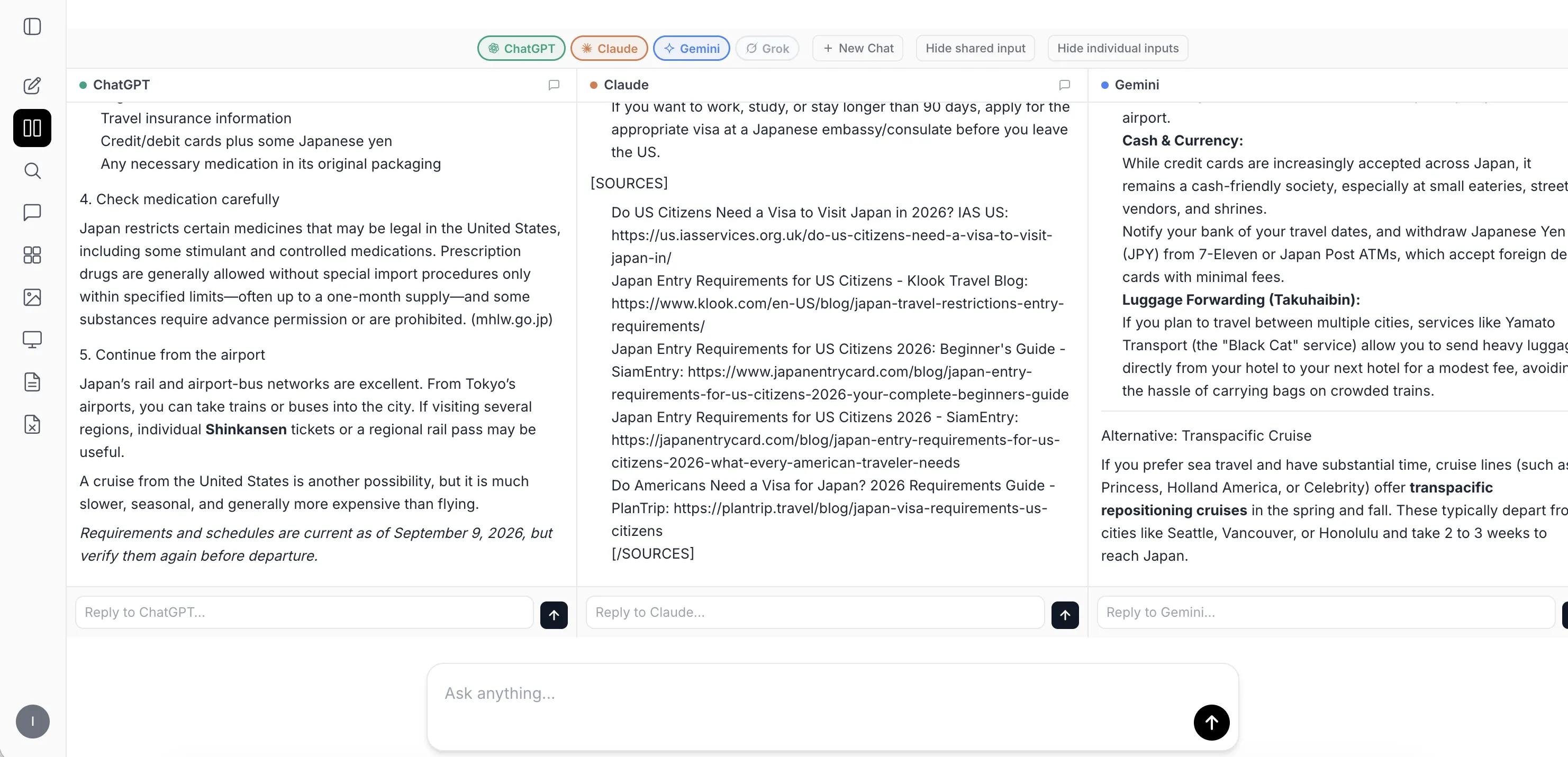
This is the core advantage: you are no longer trapped inside one model’s memory, one model’s tone, or one model’s version of the answer.
Copy this prompt.
Memory-free test prompt
“Answer this as if you have no memory of me. Do not use prior conversations, saved preferences, or assumptions about my goals. Give the neutral answer first, then list what might change if personalization were enabled.”
For high-stakes questions, follow that prompt with: “What claim in your answer most needs external verification?” Then verify that claim outside the conversation.
Bottom line
Memory is useful. Neutrality is different.
Use memory when you want continuity. Use AI without memory when the answer needs to be less personal, easier to compare, and easier to verify.
FAQ
Try the clean workflow
Ask once. Compare several answers. Remove the memory bias.
Use MultipleChat Compare Mode to get up to 4 answers from multiple AI models side by side. Compare Mode does not save your preferences in memory, and the AI models do not know who you are.
Activate Compare Mode